


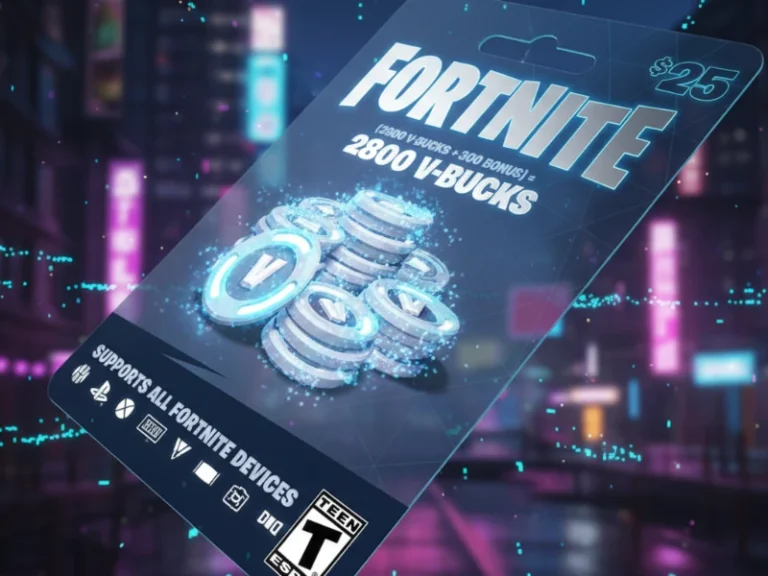
Have a Fortnite V-Bucks card sitting around collecting dust? I’ve cashed in my share of cards across various platforms, and believe me, the process is a cinch when you know the platform-specific quirks. It doesn’t matter whether you’re playing on PC, PlayStation 5, Xbox Series ,X or Nintendo Switch — we’ll show you everything you need to do to make sure those V-Bucks hit your account without any hiccups.
But before we get into the details, here’s what you’ll need to know: V-Bucks cards must be redeemed directly through Epic Games’ website – regardless of your gaming platform, but that will likely change soon. Console players have an added step with secondary codes, but i’ll go through it all for you.
What You Need to Know
| Platform | Primary Redemption | Secondary Step Required | Estimated Time |
|---|---|---|---|
| PC | fortnite.com/vbuckscard | None | 2-3 minutes |
| PlayStation 5 | fortnite.com/vbuckscard | 12-digit PS Store code | 5-7 minutes |
| Xbox Series X/S | fortnite.com/vbuckscard | 25-digit Microsoft code | 5-7 minutes |
| Nintendo Switch | fortnite.com/vbuckscard | Automatic (after linking) | 3-5 minutes |
| Mobile/Tablet | fortnite.com/vbuckscard | None | 2-3 minutes |
Important Note: In 2025, Epic Games is gradually replacing traditional V-Bucks cards with new Fortnite gift cards that add funds to your Epic account balance. Old V-Bucks cards remain redeemable at fortnite.com/vbuckscard, while new gift cards use epicgames.com/redeem.
Understanding V-Bucks Cards vs. New Fortnite Gift Cards
Before redeeming, you should know which card type you have. Based on my experience testing both systems, here’s the breakdown:
| Card Type | Redemption URL | Value Format | Best For | Special Bonus |
|---|---|---|---|---|
| Traditional V-Bucks Cards | fortnite.com/vbuckscard | Fixed V-Bucks (1,000 – 13,500) | Direct V-Bucks only | None |
| New Fortnite Gift Cards | epicgames.com/redeem | Dollar amounts ($15 – $150) | V-Bucks, Crew, Store purchases | GHOST Monks Outfit (until Dec 31, 2026) |
Traditional V-Bucks Cards (Still Valid):
- Contain a specific number of V-Bucks (1,000, 2,800, 5,000, or 13,500)
- Add V-Bucks directly to your account
- Available until existing retail stock runs out
New Fortnite Gift Cards (Rolling Out Globally):
- Add funds to Epic account balance (use for V-Bucks, Fortnite Crew, Epic Games Store purchases)
- Include exclusive GHOST Monks Outfit bonus through December 31, 2026
- Offer 20% back in Epic Rewards for in-game purchases
The redemption processes differ slightly, so make sure you’re using the correct website for your card type.
Step-by-Step: How to Redeem V-Bucks Card on PC
PC redemption is the most straightforward method. Here’s exactly what I do every time:
Step 1: Verify Your Epic Games Account
Head to your account settings and confirm you’re logged into the correct Epic Games account. This seems obvious, but I’ve seen friends accidentally redeem cards to old accounts they no longer use. Your Display Name should match your in-game name.
Step 2: Access the Redemption Portal
Navigate to [https://www.fortnite.com/vbuckscard] in your browser. Alternatively, log into Fortnite’s website, click your profile picture in the top-right corner, and select “V-Bucks Card” from the dropdown menu.
Step 3: Enter Your Code
Click “Get Started” to begin. Carefully enter the 16-digit PIN code from the back of your card—no dashes needed. Double-check for common mistakes like confusing “0” (zero) with “O” (letter O).
Step 4: Select Your Platform
When prompted, choose “PC” from the platform dropdown menu. This tells the system where to deliver your V-Bucks.
Step 5: Confirm and Launch
Review the details showing your Epic account, selected device, and new V-Bucks balance. Click “Confirm” to finalize. Launch Fortnite on your PC, and your V-Bucks will appear in the top-right corner of your screen.
How to Redeem V-Bucks Card on PlayStation 5
PlayStation redemption requires two steps because of Sony’s payment system. In my testing, this process takes about 5-7 minutes total.
Step 1: Initial Epic Games Redemption
Visit [https://www.fortnite.com/vbuckscard] and log in to your Epic Games account (make sure it’s linked to your PlayStation Network account). Enter your 16-digit V-Bucks card PIN and click “Next.”
Step 2: Select PlayStation Platform
Choose “PlayStation” from the platform dropdown. This is critical—selecting the wrong platform will cause redemption issues.
Step 3: Receive Secondary Code
After clicking “Confirm,” the system generates a 12-digit PlayStation Store code. This code is also emailed to your registered email address for backup.
Step 4: Redeem on PlayStation Store
The redemption page automatically redirects you to the PlayStation Store website (or you can access it manually). Sign into your PlayStation Network account—ensure it’s the same account linked to your Epic Games profile.
Step 5: Enter Secondary Code
Input the 12-digit code in the PlayStation Store redemption field. Follow the on-screen prompts to complete the process.
Step 6: Launch Fortnite
Start Fortnite on your PS5. Your V-Bucks balance should update immediately. If there’s a delay, try logging out and back into Fortnite.
How to Redeem V-Bucks Card on Xbox Series X/S
Xbox follows a similar two-step process to PlayStation, but uses a 25-digit code instead.
Step 1: Epic Games Website Redemption
Go to [https://www.fortnite.com/vbuckscard] while logged into your Epic Games account. Verify your Microsoft account is properly linked under your Epic account connections.
Step 2: Enter Card Code
Type in your 16-digit V-Bucks card PIN (no dashes) and click “Next.”
Step 3: Choose the Xbox Platform
Select “Xbox” from the platform dropdown menu when prompted.
Step 4: Generate Microsoft Code
Click “Confirm” to receive your 25-digit Xbox gift card code. This code is sent to your email and displayed on screen.
Step 5: Redeem on Microsoft
The system directs you to Microsoft’s redemption portal. Sign in using your Xbox/Microsoft account credentials. I recommend using an incognito browser window if you have multiple Microsoft accounts to avoid confusion.
Step 6: Complete Redemption
Enter the 25-digit code into Microsoft’s redemption field. After successful processing, launch Fortnite on your Xbox to see your updated V-Bucks balance.
How to Redeem V-Bucks Card on Nintendo Switch
Switch redemption has one unique requirement: you cannot redeem V-Bucks cards directly on the console. Everything happens through Epic’s website.
Step 1: Link Your Nintendo Account
Before redeeming, ensure your Nintendo Account is properly linked to your Epic Games account. You can verify this in your Epic account settings under “Connections.” If unlinked, follow Epic’s linking instructions first.
Step 2: Access Redemption Portal
Visit fortnite.com/vbuckscard on any web browser (computer, phone, or tablet).
Step 3: Sign In and Begin
Click “Get Started” and sign in to your Epic Games account if prompted. Click “Get Started” again on the next screen.
Step 4: Enter PIN Code
Input the PIN from the back of your V-Bucks card without dashes, then click “Next.”
Step 5: Select Nintendo Switch
Choose “Nintendo Switch” from the platform options. If Nintendo Switch doesn’t appear as an option, your Nintendo Account isn’t linked properly—go back and complete the linking process.
Step 6: Confirm Details
Review your Epic account information, selected device, and new balance. If everything looks correct, click “Confirm.”
Step 7: Check Balance on Switch
Open Fortnite on your Nintendo Switch or Switch 2 console. Your V-Bucks should appear immediately in your account balance.
Troubleshooting Common V-Bucks Redemption Issues
Through my experience helping friends and testing multiple scenarios, here are the most common problems and their solutions:
| Error Type | Main Cause | Quick Fix | Contact Support? |
|---|---|---|---|
| “Invalid Code” | Typos, unactivated card, region mismatch | Double-check code, verify activation, check region | If the code is correct |
| V-Bucks Not Appearing | Server delay, wrong platform | Restart the game, verify the platform match | After 24 hours |
| “Card Not Activated” | The store didn’t scan at checkout | Return to the retailer with the receipt | No (retailer issue) |
| Wrong Account | Logged into the incorrect Epic account | Contact Epic Support immediately | Yes (with proof) |
| Missing Secondary Code | Email delay, spam folder | Check email and spam folder | If not received |
| Account Linking Problems | Disconnected accounts | Reconnect in the Epic account settings | If reconnection fails |
“Invalid Code” Error
This frustrating message usually means one of three things. First, check for typos—I’ve found that mistaking similar characters like “0” and “O” or “I” and “1” causes most invalid code errors. Second, the card might not be activated at the point of sale. Retailers must scan cards at checkout to activate them; if this didn’t happen, contact the store with your receipt. Third, region restrictions apply—V-Bucks cards purchased in one country may not work in another region.
V-Bucks Not Appearing After Redemption
If you’ve successfully redeemed but don’t see your V-Bucks, completely close and restart Fortnite. Log out of your Epic Games account and log back in. Server delays during peak times can cause temporary display issues. For console players, ensure you launch Fortnite on the same platform where you redeemed the secondary code.
“Card Not Activated” Message
When you receive the error “This code has not been activated. Please see your retailer,” the card is inactive. Epic Games Player Support cannot activate these cards—you must return to the retailer where you purchased it with your receipt. This is a store-level issue, not an Epic Games problem.
Wrong Account Redemption
I’ve seen this happen more than you’d think. If you accidentally redeemed V-Bucks to the wrong Epic Games account, contact Epic Games Support immediately with your purchase details. V-Bucks aren’t transferable between accounts, but Epic may assist if you contact them quickly with proof of purchase.
Missing Secondary Code (Console Players)
For PlayStation and Xbox users, if you didn’t receive your secondary code, check your email inbox and spam folder. The code is sent to the email address associated with your Epic Games account. You can also log back into the redemption page to retrieve the code.
Account Linking Problems
Platform linking issues prevent successful redemption. Verify all accounts are properly connected by logging into your Epic Games account settings and checking the “Connections” tab. Disconnect and reconnect accounts if necessary, ensuring you’re using the correct credentials for each platform.
Security Tips: Protecting Your V-Bucks and Account
Based on what I’ve learned about managing multiple gaming accounts, follow these security practices:
Enable Two-Factor Authentication (2FA) on your Epic Games account immediately. This prevents unauthorized access even if someone obtains your password. Epic also offers exclusive rewards for 2FA users.
Keep Your Receipt from V-Bucks card purchases. If redemption issues arise, retailers and Epic Support require proof of purchase for assistance.
Buy from Authorized Retailers Only. Avoid auction sites, sketchy online marketplaces, or anyone offering “cheap V-Bucks.” These are often scams involving stolen or fake codes. Stick to official retailers like Walmart, Target, GameStop, Best Buy, or Epic’s website.
Verify Redemption URLs. Always type URLs directly into your browser or use official Epic Games links. Phishing sites mimic Epic’s redemption pages to steal codes and account information.
Check the account before confirming. Before clicking “Confirm” on any redemption, verify the Epic account display name matches your primary gaming account. One extra second of checking prevents costly mistakes.
Understanding Cross-Platform V-Bucks Access
One question I get constantly: “Will my V-Bucks work on all my devices?” Here’s the important distinction:
V-Bucks are account-based, not device-specific. Once redeemed to your Epic Games account, they sync across most linked platforms including PC, PlayStation, Xbox, and mobile. The major exception is Nintendo Switch—V-Bucks purchased directly on Switch stay on Switch due to Nintendo’s shared wallet restrictions.
However, V-Bucks redeemed through Epic’s website (including V-Bucks cards) appear across all linked platforms. This makes gift card redemption more flexible than direct in-console purchases for Switch players.
Spending Your V-Bucks: What You Can Buy
After redemption, your V-Bucks unlock Fortnite’s entire Item Shop ecosystem. You can purchase:
- Outfits (Skins): From collaborations with Marvel, DC, Star Wars, anime series, and original Epic designs (like the Stranger Things skins or exclusive Vecna skin)
- Back Bling: Customizable backpack accessories
- Pickaxes: Unique harvesting tools with special animations
- Emotes: Dance moves, expressions, and built-in emotes
- Gliders: Parachute designs for dropping into matches
- Wraps: Weapon and vehicle skins
- Battle Pass: Seasonal progression system with exclusive rewards
- Fortnite Festival Jam Tracks: Music content for Festival mode
- Instruments: Guitar, bass, drum, and microphone cosmetics
You can also use the recently launched Web Shop to purchase items without opening the game, and save V-Bucks for limited-time collaborations that frequently rotate through the Item Shop.
New Fortnite Gift Cards: What’s Different in 2025
Epic Games is phasing out traditional V-Bucks cards in favor of multipurpose Fortnite gift cards. If you receive one of these new cards, the redemption process differs slightly:
Redemption Location: Use epicgames.com/redeem instead of fortnite.com/vbuckscard
Funds Destination: Money adds to your Epic account balance (wallet) rather than direct V-Bucks
Expanded Uses: Purchase V-Bucks, Fortnite Crew subscriptions, in-game packs, Epic Games Store titles, DLCs, and fab.com content
Bonus Outfit: First-time gift card redemption unlocks the exclusive GHOST Monks Outfit (through December 31, 2026)
Epic Rewards: Earn 20% back in Epic Rewards on Fortnite, Rocket League, and Fall Guys purchases using Epic’s payment system
The new system provides more flexibility, letting you decide whether to buy V-Bucks immediately or save funds for Fortnite Crew or other Epic ecosystem purchases.
Age Restrictions and Cabined Accounts
If you’re redeeming for a younger player, be aware that Fortnite implements age-based restrictions. Players in Cabined Accounts (under 13 in most regions, or under their region’s digital age of consent) can add gift card funds to their Epic account balance, but these funds can only be used to purchase Epic’s games, like Fortnite. Fortnite Crew subscriptions and certain other purchases require parental or guardian approval.
When redeeming on mobile devices, accounts under 18 may face parental control restrictions that block confirmation prompts. Verify account age settings and adjust family or privacy controls in your platform’s account management if you encounter issues.
Frequently Asked Questions
Can I gift V-Bucks directly to friends?
Can I redeem multiple V-Bucks cards to the same account?
My card was already redeemed but I never used it. What should I do?
Read Also
Looking for more ways to enhance your Fortnite experience? Check out the latest Fortnite Go Goated codes for 2025 to unlock exclusive rewards and level up your gameplay.