


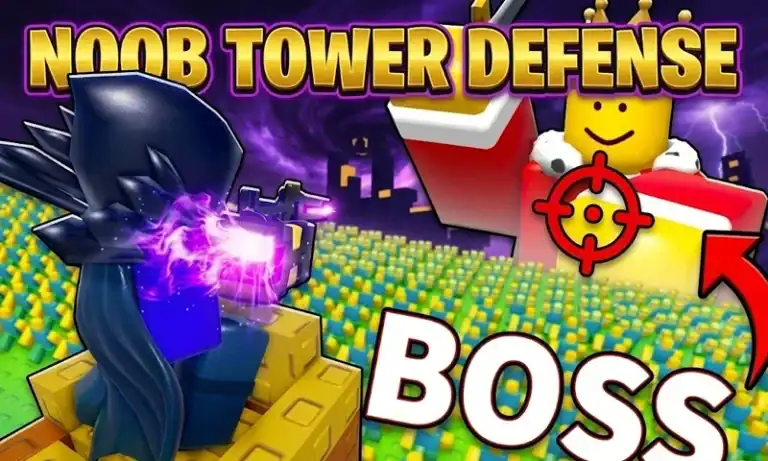
Here are all the active Noob Tower Defense codes right now: UPD3 (300 Coins), NTDSPRING (300 Gems), LIKES18K (400 Gems), hallsecret (200 Coins), and UPD2 (300 Gems). Redeem them fast. NTD codes expire without warning once the game moves to the next milestone.
Active Noob Tower Defense Codes (May 2026)
Three of the five codes below dropped during the last refresh cycle, so if you have not already redeemed them yet, lucky you. Copy each code as it is. The redemption box in the game is case-sensitive, so if you inadvertently mistype a letter (capitalize it) your attempt will fail.
| Code | Reward | Status |
|---|---|---|
| UPD3 | 300 Coins | Active (NEW) |
| NTDSPRING | 300 Gems | Active (NEW) |
| LIKES18K | 400 Gems | Active (NEW) |
| hallsecret | 200 Coins | Active |
| UPD2 | 300 Gems | Active |
Total from all five codes: 500 Coins + 1,000 Gems. That’s a solid batch. Gems especially, since they’re the primary currency for summoning new noob units.
Expired Noob Tower Defense Codes
These codes no longer work. They’re listed here so you don’t waste time testing them:
| Expired Code |
|---|
| Likes6k |
| likes7k |
| LIKES5K |
| LIKES2K |
| LIKES500 |
| SHIFTLOCK |
| 100KVISITS |
| rewrite |
| 500LIKES |
| 100likes |
| 1000LIKES |
How to Redeem Noob Tower Defense Codes
You can’t use codes the moment you boot the game. The tutorial must be completed first, it’s a short onboarding sequence, but it’s a hard gate. Skip it and the gear button simply won’t appear.
Once that’s done, here’s the exact redemption process:
| Step | Action |
|---|---|
| Step 1 | Launch Roblox and open Noob Tower Defense from your game library or the search bar |
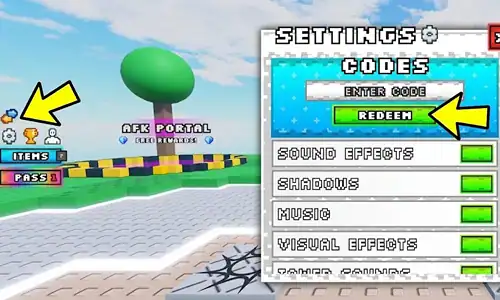
| Step 2 | Click the gear icon on the left-side menu, it sits below the shop and above the leaderboard shortcut |
| Step 3 | Inside the settings panel, find the input box labeled “ENTER CODE” and click or tap it |
| Step 4 | Paste your code directly from the table above, never type it manually |
| Step 5 | Click the REDEEM button, a success notification confirms the reward landed in your account |
If no notification appears, or you get an error message, the troubleshooting section below has the fix.
Why Your Noob Tower Defense Codes Aren’t Working
The most common fix isn’t obvious at first: you’re probably on an old server.
When a new NTD update or milestone drops, that’s when codes go live. But Roblox servers don’t all update simultaneously, older public servers may not recognize new codes yet. The solution is to either join a private server (even a free one works) or wait until the public server you’re on cycles through a restart.
Here are the other causes worth checking:
| Cause | Fix |
|---|---|
| Old server not synced | Switch to a private server or wait for a public server restart |
| Case sensitivity mismatch | Always paste the code, never retype it manually |
| Tutorial not completed | Finish the tutorial wave before the code menu becomes accessible |
| Code already redeemed | Each code works once per account, check your rewards history |
| Code has expired | Cross-reference the expired list above before troubleshooting further |
Where to Get New Noob Tower Defense Codes
The official source is the Noob Tower Defense Discord server. There’s a dedicated #codes channel where new codes post when the game hits subscriber, visit, or update milestones.
That said, the Discord channel sometimes lags, old codes stay pinned, newer ones get buried in announcement noise. A few codes that are still active won’t appear there at all.
The smarter move: bookmark this page. It gets checked and updated each time a new NTD update drops or a milestone is confirmed, so you’re not digging through Discord threads to figure out what’s current.
You can also follow the game’s official Roblox page for update announcements, those often hint at incoming codes even if the code itself isn’t posted yet.
If you play other Roblox games while waiting for new NTD drops, Anime World Tower Defense codes are updated on the same schedule and worth keeping on hand.
Pro Tips for Getting the Most Out of NTD Codes
| Tip | Why It Matters |
|---|---|
| Redeem gems before a balance patch | Gem economies in Roblox TD games can shift within days of a major update, don’t sit on them |
| Test codes separately on a fresh account | Isolates server lag errors from actual expired codes |
| Use a private server for redemption | Fixes 90% of “code not working” errors caused by old server sync issues |
| Watch for milestone numbers | NTD codes typically drop at round like counts (6K, 18K), visit counts (100K), and update tags (UPD2, UPD3) |
FAQ
What are the working Noob Tower Defense codes right now?
How do you redeem codes in Noob Tower Defense?
Why won't my Noob Tower Defense code work?
What do NTD codes give you?
How often do new Noob Tower Defense codes come out?
Are there Noob Tower Defense codes specifically for gems?
Can I use Noob Tower Defense codes more than once?
What to Do Next
Redeem all five codes now before any of them expire, starting with LIKES18K for the highest single-code gem yield.
Instead of going ham with cosmetic upgrades early, save your gems for units that have high base defense stats until you get your gems in.
If you’ve finished everything Noob Tower Defense has to offer (and are patiently waiting for the next update), you might want know that other Roblox games would be worth hopping into. Pop Starz codes are active right now and regularly updated, so there’s no downtime between sessions.
For more Noob Tower Defense codes as they drop, keep this page bookmarked, it gets updated each time a new code or milestone is confirmed.