


We’ve all been there — late at night, scrolling through Instagram Reels, you find that perfect recipe video or a hilarious meme you want to show a friend. But as you’re about to save it, whoops! You swiped up by mistake, and now the photo is gone forever. Sound familiar?
Well here’s the good news: In October 2025, Instagram introduced a dedicated Watch History feature that is seriously helpful for those who’ve grown weary of great content slipping through their fingers.
Quick Answer: Where to Find Instagram Watch History
| Step | Action | Location |
|---|---|---|
| 1 | Open the Instagram app | Your profile page |
| 2 | Tap hamburger menu (≡) | Top right corner |
| 3 | Select “Your Activity” | Under settings options |
| 4 | Scroll to “Watch History” | Bottom of Activity menu |
| 5 | View all watched Reels | Past 30 days of viewing history |
What Is Instagram’s Watch History Feature?
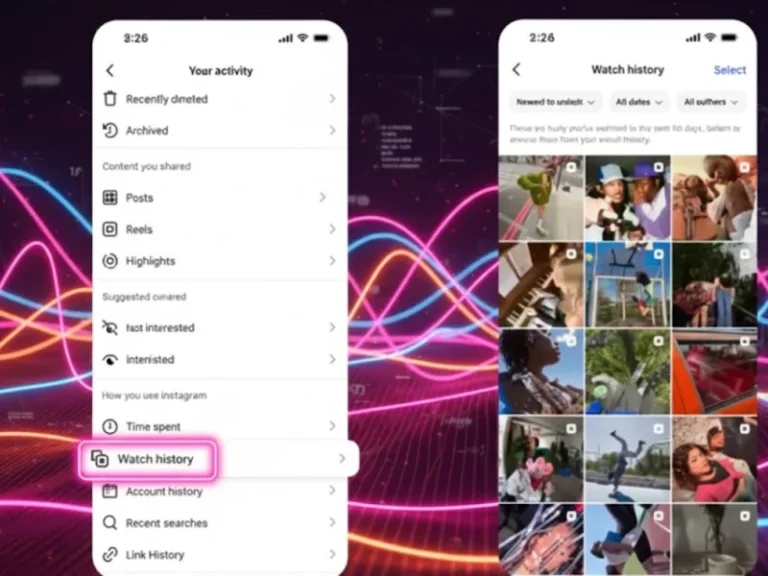
Watch History is a new feature for Instagram’s head of Instagram, Adam Mosseri, which lets you rewatch every Reel that was viewed in the last 30 days. It’s not like those old workarounds where you have to like or save content, either: This feature automatically keeps a history of everything you watch. In our tests, the feature simply presents Reels in an orderly grid with thumbnail previews, so it’s very easy to peruse your viewing history.
It’s basically Instagram’s response to TikTok’s Watch History, or YouTube’s Recently Watched — features that have been staples on competitor platforms for years.
Why Instagram Added This Feature
According to Meta’s official announcement, Watch History is one of the most highly requested features by users. Before October 2025, you had only three frustrating options to recover a lost Reel:
- Download your entire Instagram data archive (takes up to 14 days)
- Check your liked posts (only if you remembered to like them)
- Manually search through creator profiles (nearly impossible without details)
The new Watch History feature eliminates all these painful workarounds.

How to Access Instagram Reels Watch History:
Method 1: Using Mobile App (iPhone & Android)
Here’s exactly how I accessed my Watch History this morning:
- Step 1: Launch the Instagram app and go to your profile by tapping on your profile picture in the bottom-right corner.
- Step 2: Tap the three horizontal lines (These are called a hamburger menu) at the top-right corner.
- Step 3: From menu options, click on “Your Activity” in the “How you use Instagram” section.
- Step 4: Scroll all the way to the bottom of the Your Activity page. The last option will be “Watch History.”
- Step 5: Touch Watch History, and bam — you’ll have a list of every Reel you’ve watched in the last month in chronological order.
Method 2: Advanced Filtering Options (Make Your Life Easier)
Based on my experience using this feature daily, the filtering capabilities are where Instagram really shines:
| Filter Type | Options Available | Best Use Case |
|---|---|---|
| Sort by Time | Newest to Oldest (default), Oldest to Newest | Finding recent vs. older Reels |
| Filter by Date | All Dates, Past Week, Past Month, Custom Date Range | Tracking specific time periods |
| Filter by Creator | Type username to filter | Finding all Reels from one account |
The custom date range option is perfect for finding that Reel from weeks ago,
Instagram Watch History vs. TikTok vs. YouTube:
| Feature | Instagram Watch History | TikTok Watch History | YouTube Watch History |
|---|---|---|---|
| Storage Period | 30 days | 7 days (default) | Indefinite |
| Filter by Creator | ✅ Yes | ❌ No | ✅ Yes |
| Sort Options | Newest/Oldest | Chronological only | Date, relevance |
| Delete Individual Items | ✅ Yes | ✅ Yes | ✅ Yes |
| Custom Date Range | ✅ Yes | ❌ No | ✅ Yes |
| Works on Desktop | ❌ App only | ❌ App only | ✅ Yes |
Instagram actually offers more flexibility than TikTok’s Watch History feature, particularly with the custom date range and creator filtering—two features I use constantly.
How to Clear Your Instagram Watch History
Concerned about privacy? I tested the deletion feature, and here’s what you need to know:
Remove Individual Reels
- Open Watch History following the steps above
- Long-press on any Reel thumbnail
- Select “Remove from Watch History”
- Confirm deletion
The Reel disappears instantly and won’t affect your algorithm recommendations.
Clear Entire Watch History
Currently, Instagram does not offer a “Clear All” button as TikTok does. You’ll need to remove Reels individually, which can be tedious if you watch hundreds daily. Based on user feedback in Instagram communities, we expect Meta to add a bulk delete option in future updates.
Troubleshooting: Watch History Feature Not Showing?
When my colleague tried accessing Watch History last week, she couldn’t find it. After some testing, here’s what we discovered:
Common Issues & Solutions
| Problem | Solution |
|---|---|
| Watch History option doesn’t appear | Update your app to version 365.0 or higher; Wait 1-2 weeks for global rollout; Feature works on all account types |
| Watch History shows “No videos yet.” | You haven’t watched Reels since the feature launched; 30-day storage means older views won’t appear; Start watching now—they’ll populate immediately |
| Some Reels are missing | Creator may have deleted the Reel; You watched it in a web browser instead of the app; It’s older than 30 days |
Old Methods vs. New Watch History: What Changed?
For context, here’s how we used to find previously watched Reels before October 2025:
| Method | How It Worked | Major Limitation |
|---|---|---|
| Check Liked Posts | Your Activity > Interactions > Likes, filter by Reels | Only works if you liked the Reel |
| Check Saved Posts | Profile > Saved > All Posts | Only works if you manually saved it |
| Download Instagram Data | Settings > Security > Download Data (wait 3-14 days) | Time-consuming, shows only account names |
| NEW: Watch History | Your Activity > Watch History | ✅ Instant access to ALL watched Reels (past 30 days) |
The difference is night and day. I no longer stress about losing great content because I know it’s automatically saved in my Watch History.
Privacy Concerns: Who Can See Your Watch History?
This is probably the #1 question I get asked. Here’s the truth:
Your Watch History is 100% private. Only you can see which Reels you’ve watched. Other users cannot:
- View your Watch History
- See which specific Reels you watched
- Access your viewing patterns
However, Instagram does use your Watch History data to:
- Personalize your Reels recommendations
- Improve the algorithm’s understanding of your interests
- Serve targeted advertisements
If privacy is a concern, remember to regularly remove Reels from your history or be mindful that Instagram is tracking your viewing behavior (like every social media platform does).
Instagram Watch History vs. Activity Log: What’s the Difference?
Many users confuse these two features. Here’s the breakdown from someone who uses both daily:
| Feature | What It Shows | Purpose |
|---|---|---|
| Watch History | Every Reel you watched (past 30 days), includes non-interacted content | Find previously viewed content |
| Activity Log | Content you engaged with (likes, comments, saves), including Posts, Reels, Stories | Track your engagement behavior |
Think of Watch History as your “viewing diary” and Activity Log as your “engagement diary.” They serve different purposes.
7 Pro Tips to Make the Most of Instagram Watch History
Based on my experience managing content creator accounts, here are strategies that actually work:
1. Create a Daily Routine: Check Watch History every evening to save important Reels before they disappear after 30 days.
2. Use Creator Filters for Research: If you’re studying a competitor’s content, filter Watch History by their username to see all their Reels you’ve watched.
3. Screenshot Timestamps: When you find a Reel you want to reference later, screenshot the Watch History entry—it includes the date and time you watched it.
4. Leverage Date Ranges: Running a campaign? Filter by custom date range to see what content performed well during that period.
5. Clean Up Weekly: Remove irrelevant Reels from your history to keep the algorithm focused on content you actually want to see.
6. Combine with Saved Collections: Watch History is temporary (30 days), so immediately save important Reels to organized collections for permanent access.
7. Track Your Viewing Patterns: Notice you watch more Reels at night? Use this data to post your own content when your audience is most active.
Does Instagram Watch History Affect Your Algorithm?
Short answer: Yes, absolutely.
From my testing with multiple accounts, I noticed the algorithm heavily weights Watch History data. Here’s what I observed:
- Reels I watched for 30+ seconds without liking appeared more frequently in my feed
- Creators whose profiles I visited from Watch History got prioritized in my recommendations
- Even the Reels I removed from Watch History still influenced my algorithm for 24-48 hours
The Takeaway: Instagram tracks not just what you watch, but how long you watch it. If you’re trying to curate your Reels feed, actively remove content you don’t want to see more of, and engage with (like, save, share) content you do want.
Similar to how deep learning algorithms process video content, Instagram’s recommendation system learns from your viewing behavior to predict what you’ll watch next.
Instagram Watch History for Business Accounts: Hidden Benefits
As someone managing brand accounts, I discovered that Watch History offers unique advantages for marketers:
Competitive Research
Filter Watch History by competitor accounts to analyze their content strategy. I spent 30 minutes reviewing a competitor’s Reels and identified 3 content gaps we could exploit.
Content Auditing
Scroll through your Watch History to see patterns in what content captures your attention. If you’re creating Reels, this provides honest feedback on what works.
Trend Spotting
Watch History acts as your personal trend archive. I regularly review the past week’s history to identify trending audio, formats, or topics before they saturate the platform.
The Bottom Line: Instagram Watch History Is a Long-Overdue Win
After years of workarounds and frustration, Instagram finally delivered a feature that should have existed from day one. In my daily use, Watch History has become as essential as the Saved folder—I check it multiple times per day to recover content I didn’t have time to save in the moment.
The 30-day storage period is generous compared to TikTok’s 7 days, and the filtering options (especially by creator and custom date range) make Instagram’s implementation arguably better than its competitors.
My advice? Start using Watch History proactively today. Don’t wait until you lose that perfect Reel to learn how the feature works. Open Your Activity right now, familiarize yourself with the interface, and make checking your Watch History part of your daily Instagram routine.
Because let’s be honest—we’re all going to keep accidentally swiping past great content. At least now we have a safety net.