


How to See Your Spotify Wrapped 2025: Everything You Need to Know for Mobile & Desktop
It is now that time of year, Spotify Wrapped 2025! This annual roundup of music reveals your most-played songs, artists and listening habits. Regardless of whether you are on an iPhone, Android or desktop, finding your Wrapped is easy. This guide tells you exactly how to find Spotify Wrapped 2025 and troubleshoots common issues.
What is Spotify Wrapped 2025?
Spotify Wrapped is back with a personalized year-end music summary. It shows the songs you listened to most, your favorite artists and your total listening time. Among other thrilling plans, the 2025 edition has some exciting new additions. You’ll find out your listening age, join exclusive clubs and compete with friends.
With the Spotify Wrapped apps, checking your stats becomes fun and interactive. It functions the way Instagram or TikTok stories do. You can just scroll up to see various statistics.
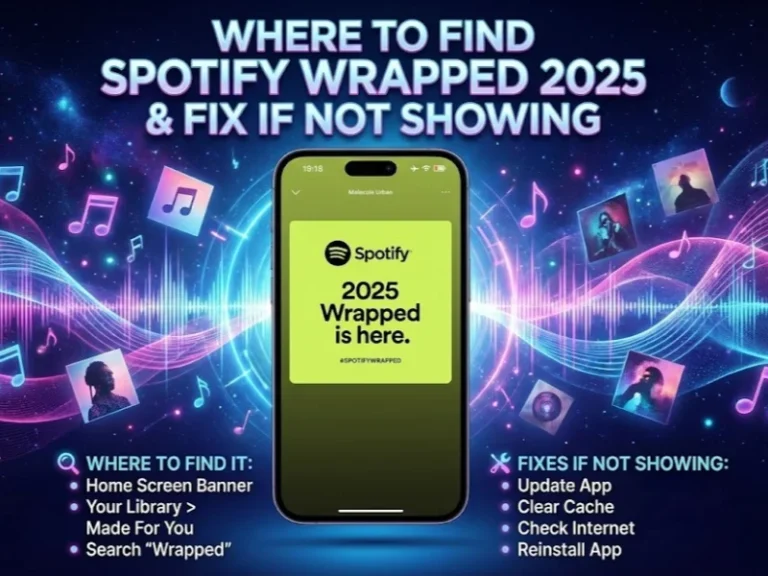
Where to Find Spotify Wrapped 2025 on iPhone
It only takes a few seconds to find your Spotify Wrapped mobile recap on iPhone. Follow these simple steps:
Step 1: Open the Spotify app on your phone.
Step 2: Scroll to the top of your Home page and find the pill button labeled “Wrapped.”
Step 3: Tap the Wrapped button.
Step 4: Your very own Wrapped 2025 feed will open immediately.
Step 5: Tap “Your Wrapped 2025” to begin going through it.
The interface is user-friendly. For each slide, swipe up to see your stats. You can stop, return or skip parts at anytime.
How to Get Spotify Wrapped 2025 on Android
Android users can check out Spotify Wrapped in the same way. It’s just like iPhone:
Launch the Spotify app on your Android. If you check it, the Wrapped notification should be on your Home page. It appears as a super-large banner or pill button. Tap to start your 2025 recap.
Your Spotify Wrapped feed opens, containing all of your customized statistics. The update to the most recent version of the app is required. Otherwise the Wrapped feature won’t show up. Learn more about when Spotify Wrapped 2025 was released and what to expect.
How to Find Spotify Wrapped 2025 on Desktop
Things are even simpler for desktop PC users. Here’s how to access Spotify Wrapped on your computer:
Open the Spotify desktop app or head to the web player. You’ll be greeted with a large banner that says “It’s time for your 2025 Wrapped.” Click on the banner “Check it out.” Your musical highlights appear instantly.
You can also go to the official Spotify Wrapped website. This way, you can access your information at a glance.
New Additions to Spotify Wrapped 2025
A few new features have been added to this year’s Wrapped. Here are the Spotify Wrapped features that personalize the experience:
Listening Age uses your music taste to compare you with others of your age. It studies the years your favorite tracks were released.
Wrapped Clubs puts you into one of six music personality categories. Every club has its own way of listening.
This year marks the debut of Top Albums. You will know which albums you played most.
Listening Archive taps AI to memorialize your memorable streaming days. It makes special memories you can personalize in snapshots.
Wrapped Party allows you to compete against friends. Turn your listening data into a live contest.
Fan Leaderboard positions you among all listeners. Find out how you measure up to other fans of your favorite artists.
How to Fix Spotify Wrapped Not Showing Issues
Sometimes there is Spotify Wrapped not showing. There’s good news — these solutions work for the majority of users:
Update Your Spotify App
Outdated apps can’t display Wrapped. Check your App Store or Play Store for updates. With iOS, iPhone users need version 9.1.0 or above. Android users require version 9.1.0.1147 or higher.
Clear Your Cache
Old cached files occasionally can be problematic. Open Settings, then Data-saving and offline. Tap “Clear cache” under Storage.
Search Manually
Go to the Spotify search bar and type in “2025 Wrapped.” You could also attempt “spotify:datastories:wrapped” for direct access.
Use the Mobile Browser
Visit spotify.com/wrapped in your phone’s browser. Log into your account there. The web player even loads faster than the app at times.
Reinstall the App
Completely remove Spotify from your device. When new, download from your app store. Your account backs up everything to the cloud. When you sign back in all your playlists and songs are there.
Check Your Eligibility
You should have at least 30 legitimate plays across five artists. The streams have to be at least 30 seconds in length. No, private mode listening won’t be counted toward Wrapped. For more details, check out the official Spotify Wrapped 2025 release information.
Sharing Your Spotify Wrapped 2025
Sharing your stats is a snap with Spotify. Each stat has a share button. Click it to share straight to social media. You can also send stats to friends via Spotify Messages.
Sharing works for all data stories. Show your top songs, artists or listening time. Start discussing music likes with friends.
When Does Spotify Wrapped End?
Wrapped usually remains accessible into early January. Spotify has not announced an exact end date. View your Wrapped while you still can.
Once Wrapped is gone, you still will have your “Your Top Songs 2025” playlist. This playlist has your 100 favorite songs of the year. Add it to your library to save forever.
Frequently Asked Questions
Q1: I can’t seem to find my 2025 Spotify Wrapped!
It should be available on the latest version of your app. Make sure you’ve streamed at least 30 songs this year. If not, clear your cache or look for “2025 Wrapped” manually.
Q2: Is Spotify Wrapped available on desktop?
Yeah, but it’s best on mobile — full experience and so forth. Desktop shows basic data stories. A few interactive features such as Wrapped Party are available on mobile only.
Q3: What was the release date of Spotify Wrapped 2025?
Spotify Wrapped 2025 premiered on December 3, 2025. It’s now available to all users worldwide.
Q4: Can free Spotify accounts get Wrapped?
Absolutely! All free and paid users have full access. Your Wrapped is viewable without a paid subscription.
Q5: What if I didn’t listen to Spotify much this year?
You won’t receive a custom Wrapped recap. Spotify could put curated playlists in front of you instead. Start listening more consistently now for next year’s Wrapped.
Q6: How long will Spotify Wrapped be available?
Wrapped typically remains available through early January. The date is not the same every year. Don’t wait too long to view yours.
Conclusion
Locating your Spotify Wrapped 2025 is quick and easy. Open up your app and find the Wrapped button. Desktop listeners can click on the banner or go to the Wrapped site.
If you experience issues, please update the app first. Clear your cache or search manually if you must. Those simple fixes cure most problems.
This year’s Wrapped is more personalized than ever. Learn your listening age, join a club and compete with friends. Tell the world your musical story and celebrate your 2025 soundtrack.