


How to Fix “Failed to Redeem” Errors
You’ve finally discovered a live code, entered it on the site, and… boom. “Failed to redeem. This code is not valid or has already been used.”
There is nothing worse for a Free Fire player. But take heart — sometimes it’s not the code, it’s the approach.
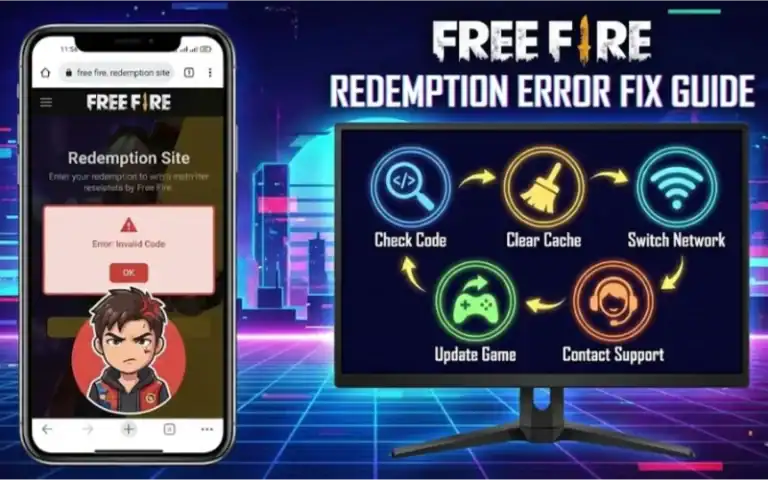
In this result pack, I will show you why these errors are happening. I will also give you 5 proven solutions. These solutions will help you get your diamonds and skins instantly.
Quick Error Fix Guide (What Am I Doing Wrong?)
But first, peep this table. If your mistake falls under one of these, you’re sorted.
| Error Message | Cause | Fix |
|---|---|---|
| “Failed to redeem” / “This code is not valid or has been used” | The code has expired/exhausted. | Redeem the code again with a new one from Active Redeem Codes List. |
| Bad Code | Typo or you picked the wrong region. | Use VPN or check the code carefully (Guide below). |
| Could Not Open Site | Server overload (Heavy load on server). | Clear cache or use Incognito mode. |
| Bind Account Error | Playing in a Guest Account. | Link your account to Google/FB. |
Method 1: The “Cache Clear” Trick (90% Success Rate)
If you’re trying to log in to a shared account and it’s not working, clear the cache and cookies on your device.
The reward site is probably slow, paged or blank out. It is likely the fault of your browser cache.
- Open Chrome on your mobile.
- Go to Settings > Privacy > Clear Browsing Data.
- Select “Cached images and files” and click Clear.
- You may have to refresh the browser and try redeeming again.
Method 2: Check to see if you have Region Restrictions ON (The Silent Killer)
Most of the Free Fire codes are regional. You can not redeem a indian server code on an eu account.
The Fix: Verify they are using the code that matches your server.
Pro Tip: For Global rewards for Free Fire, visit our new and fresh daily updating Free Fire Max Reward Redeem Codes page where the region codes are written in a simple manner.
Method 3: Get Rid of the “Guest Account” Error
You cannot redeem Codes on Guest Accounts. Period.
How to bind your account:
- Access Free Fire Options (Gear Icon) > Basic on the upper left corner.
- Click the “Basic” tab then scroll down until you find “Bind Account”.
- Connect it to Google, Facebook or VK.
- Let it sit over night and try the code again.
Method 4: Typos Are a Thing (Keep This in Mind)
The codes are a nonsensical mix of 12-16 numbers and letters.
| Common Mistake | Issue |
|---|---|
| O vs 0 | O is for the letter, 0 for the number. |
| I vs 1 | ‘I (Eye)’ and ‘1 (One)’ look alike. |
Solution: Never type manually. You have two options: Just Copy Paste code from a trustworthy source.
Still Getting Errors? Try Improving Your Game Instead
If the codes are not working today due to server issues, don’t waste your time. Much instead for building your skills at that time.
We have also shared Best Free Fire Sensitivity Settings with which you can auto-headshots even if you don’t use premium Skins.
Conclusion
A mistake does not necessarily mean you blew it. Most of the time, it’s just a browser hiccup or a server glitch. First, try clearing your cache — that corrects the issue for most players.
Still need a working code? Don’t waste time guessing. Go to our Redeem codes section now to get Free Fire Redeem Codes 2026 and redeem the codes shortly!